Connectors
The outside systems Hafrix reads from. Today there is one: Aramco, which brings every tool's field history — which well it was in, on which rig, and for how many days — so the fleet earns its run days by itself instead of by hand.
Where: capsule → Connectors (/connectors). It stands on its own, not inside a group. If the entry is missing, your group has not been granted this section — see Roles & access.
Who can do what
| Role | In Connectors |
|---|---|
| Viewer | See the counters, the Channel table and the queue — no buttons |
| Operator | + Confirm and Not ours on a queue row |
| Manager | + Sync now |
| Admin | + nothing extra on this screen — but the failure notice goes to admins |
At a glance
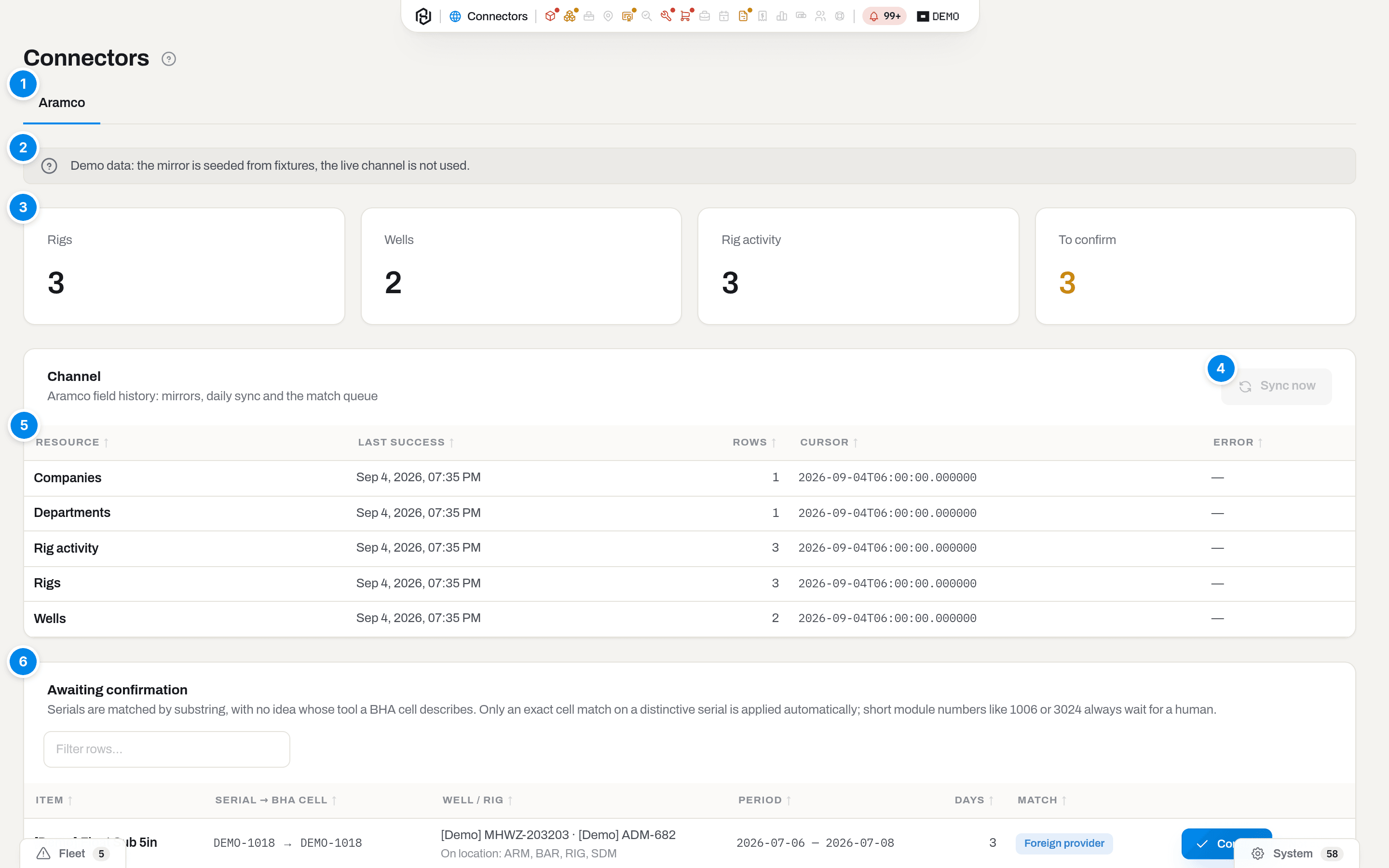
- Aramco — the connector, as a tab. There is one today; more will appear as tabs on this same screen.
- Status banner — shown only when the channel is not live. Three wordings, one per reason.
- Counters — Rigs, Wells, Rig activity: how much of the mirror is filled. To confirm counts the queue below and turns amber as soon as it is not zero.
- Sync now — runs the nightly job right now (Manager and above). Greyed out while the channel is off.
- Channel — one row per mirrored resource: when it last succeeded, how many rows it wrote, where its cursor stands, and the last error.
- Awaiting confirmation — the runs Hafrix found but will not post to a tool's timeline until a person says they are ours.
There is no Filters, no quick views and no Export here. The screen is a control panel for one background job, not a list you assemble.
Key concepts
A mirror, not a live line
Hafrix does not ask Aramco a question every time you open a screen. Once a night it copies what it needs into its own tables — rigs, wells, companies, departments, rig activity and tool history — and everything after that is read locally. Two consequences worth knowing:
- The screen keeps working when the far side is down. You are looking at last night's copy, and Last success tells you how old it is.
- Nothing is ever written back. Confirming a run changes a tool's record in Hafrix; it changes nothing in Aramco.
What actually arrives: run days by serial number
Aramco's daily rig reports list, per drilling day, every component in the string with its serial number. Hafrix asks for its own serials and stitches the answer back into runs: a run is one unbroken stretch of days one tool spent in one hole (a gap of up to two missing report days still counts as the same run).
A confirmed run reaches the tool as one run and its days in the BHA — not hours. Hours are recorded only where the report carries them, and they can arrive later than the run itself; when they do, Hafrix tops the tool up rather than counting the run twice.
Note
Field history covers tools that go downhole and carry a serial number Aramco writes down. Anything else — and anything Aramco does not see — is still entered by hand.
When it runs
The sync runs nightly at 03:15 UTC (06:15 in Riyadh), once, for every tenant with the connector switched on. That hour is not arbitrary: the far side rebuilds its daily snapshot shortly before, so running earlier would pull yesterday's picture. The snapshot itself lags reality by about a day.
Sync now runs exactly the same job on demand. It does not run a different, smaller version of it.
When the channel is off
The neutral banner under the tab appears only when the channel is not live, and its wording is the diagnosis:
| Banner | What it means | Who fixes it |
|---|---|---|
| Demo data: the mirror is seeded from fixtures, the live channel is not used. | You are in a demo tenant. Everything on the screen is fixture data, and Sync now would have nothing to call | Nobody — this is the demo working as intended |
| The Aramco connector is configured but switched off for this tenant. | The server can reach the far side; your tenant is simply not switched on for it | Hafrix support, on request |
| The Aramco connector is not configured on this server. | No credentials on this installation at all | Hafrix support |
No banner at all means the channel is live and Sync now is available to managers.
Why a person has to confirm
Serials are matched by looking for your number inside the cell someone typed on the rig floor, and that cell says nothing about whose tool it is. DEMO-1002 is genuinely inside DEMO-1002-A/2 — and 1006 is just as genuinely inside 1006893-1, which belongs to somebody else. One early run on real inventory put 2,529 junk rows in the queue off 141 serials that way.
So the rule is narrow on purpose: an exact match of the whole cell, on a serial distinctive enough to be trusted, is applied by itself. Everything else waits in the queue. Short module numbers never qualify.
Bit runs, for tools the daily rows cannot identify
Some fleets never fit the rule above. Reamer bodies are the clearest case: their numbers look like 18-1134 — short, plain and shared with half the industry — the department keeps no length for them, and the company written next to the tool in the report is whoever rented it, not whoever owns it. Every clue the matcher normally leans on says "not yours" about a tool that is plainly yours.
For those categories Hafrix asks Aramco a different question. Instead of daily rows it asks for bit runs: one row per run, with the hours already added up, the average RPM and the Krev computed on the far side. And instead of guessing ownership it uses your register: the serial is on a card in your fleet, so the tool is yours. A category is switched to this mode in Settings → Categories, and the reamer preset switches it on out of the box.
Two things change on screen:
- The tool's card shows the run's numbers — run number, hours in hole, RPM with the source it came from, and Krev. Krev on trips is listed separately from measured Krev and must never be added to it: the trip figure stands on an assumed RPM, not a measured one. When the inputs were incomplete, the line says so, and that Krev is not counted anywhere else.
- The queue tells you what a run is waiting for. Ownership is no longer in question, so the badge names the missing piece instead: No deal — the tool worked those days on that rig and no booking of yours covers them; Already counted — another posted run already covers the same days for the same tool, so confirming it would count the hours twice.
Runs marked No deal also appear in Unbilled work: a body that drilled without a booking is money, not a mystery.
Note
Rig names are matched loosely on purpose: your paperwork may call a rig DQ-48 where the reports call it DQ-48L, and a bare number like 158 belongs to the contractor your tenant names. Serial numbers can be matched the same way for a category — 18-1134 finds 181134 — and rows found that way are marked, because dropping the separators can also glue two different numbers together.
Match badges
| Badge | What it means | Where you see it |
|---|---|---|
| Exact | The BHA cell is your serial, character for character | Queue, when something else about the run still needs a look |
| Substring | Your serial was found inside a longer cell, or the same number was written with different separators — it may be a variant spelling of yours, or somebody else's number that contains yours | Queue |
| Exact cell, weak serial | The cell matches exactly, but the serial is too short or too plain to be conclusive on its own | Queue |
| Foreign provider | Not one line of this run is under your company. The tool was recognised by serial and by length, but the paperwork says somebody else ran it | Queue |
| In the register | Ownership was settled by your own fleet register, not by the report — see Bit runs | Item card |
| No deal | The body is yours and the run is real, but no booking covers those days on that rig | Queue |
| Already counted | Another posted run already covers these days for this tool | Queue |
Reports are filled in by hand on the rig, so the same motor can arrive spelled
three ways in one season: SWF-1175002, SWF1175-002, SWF1175002. For
categories set up for it, the sync asks for both spellings and shows what it
found under Substring, with the report's own spelling in the run. Three
rules keep that honest. A variant spelling is never posted on its own — a
person confirms it, which is why these arrive in the queue rather than on the
item card, and why hours for such days are never added to a run you have
already posted. A serial too plain to be conclusive is never asked for without
its separators, because 6681-1 without the dash is seven other people's
numbers. And when two of your own items spell the same number differently —
SWF-962002 and SWF962002 both on the shelf — neither is asked for without
separators, because the report cannot say which one of them was on the rig.
Which categories work this way comes with the preset their branch was built
from — the Mud motors preset asks for both spellings on mud lube and oil
sealed motors and on motor components, but not on stabilizer sleeves, see
Catalogues. Ask support to change it for a
branch of your own.
Foreign provider replaces the confidence badge when it applies, and it is the one that deserves a second question: if that really was your tool on that rig, check that the rental was invoiced for those days. On a short tool — roughly six feet and under — length proves very little (a foot of tolerance is a quarter of a three-foot sub), so hover the badge: the hint tells you to look at what else was in the string and who ran directional that day instead. When your company was not on the run, the Well / rig cell also lists who was, under On location:.
Statuses a run passes through
A run's status is not shown on this screen — the queue only ever lists what is waiting — but you meet it on the tool's card under Aramco field history.
| Badge on the item card | Meaning |
|---|---|
| Open | The run has not finished in Aramco yet. Hafrix will not post it: a run that ends "yesterday" can still grow, and posting it now would freeze three days where twenty belong |
| Pending | Waiting for a person — this is the queue |
| Applied | On the tool's timeline |
| Rejected | Someone said it was not ours; it will not come back |
Reading the Channel table
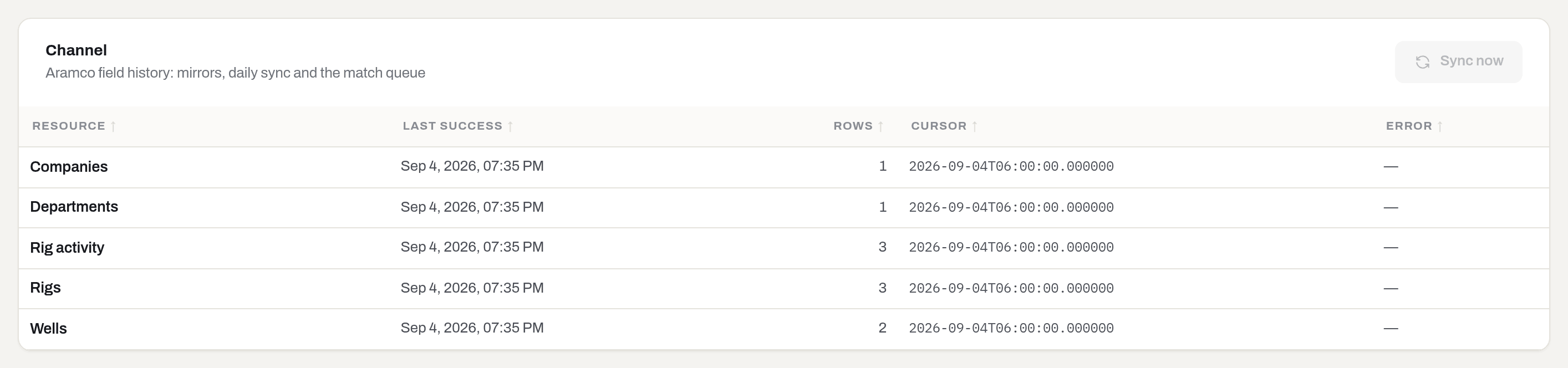
| Column | What it tells you |
|---|---|
| Resource | Which mirror: Rigs, Wells, Companies, Departments, Rig activity, Tool history, Bit runs |
| Last success | When that mirror last came back clean. Stale here and green everywhere else still means stale data |
| Rows | How many rows the last run wrote — zero is normal on a quiet night |
| Cursor | Where the mirror stopped, echoed back to the far side on the next run. Read-only, and — until the first success |
| Error | The last failure, in red. Empty is —. Bit runs shows one message that is not a failure: see the FAQ below |
A resource with no row at all has never been synced; when nothing has ever run, the table itself says Never synced.
How to
Run a sync now
Who: Manager and above.
- Open Connectors → the Aramco tab.
- Click Sync now, top right of the Channel card.
Result: the button reads Saving…, a toast says Saved, and the run starts in the background — it is the nightly job, not a shortcut version of it. Last success, the counters and the queue move when it finishes, so give it a minute and reload the page; they do not tick up live.
If it fails: Requires tenant role 'manager' or higher — ask an admin for the role. If the button is greyed out, the channel is off for this tenant — see the banners; nothing you do on this screen turns it on.
Confirm a run as yours
Who: Operator and above.
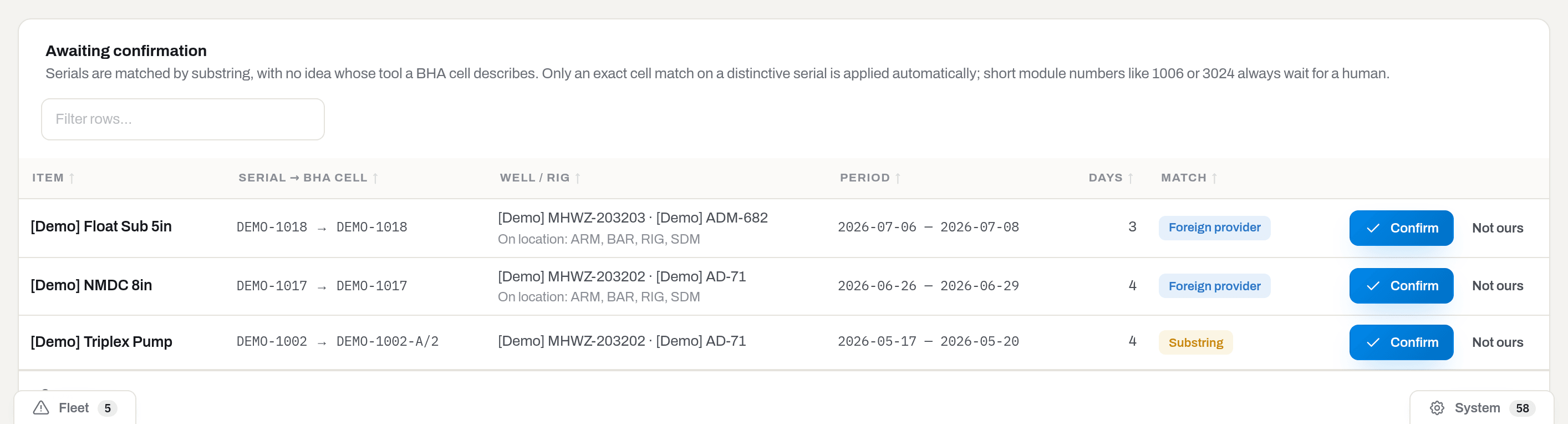
The queue pages through the server, not the browser: on a tenant with hundreds of pending rows a page loads only what fits, and the row count follows the filters. Category narrows it to one branch of the tree (picking a parent keeps its subtypes too), and the search field matches a serial number, well name or rig name at once.
- Read the row across: which tool, your serial → the cell as it was written, which well and rig, the dates, the days, and the match badge.
- Unsure? Click the tool's name — it opens the item card in the same tab, and Aramco field history there shows what else that tool has been doing. A pending run there carries the same Confirm / Not ours buttons, so a decision made while reading the tool's history does not require a trip back to the queue.
- Click Confirm.
Result: the row leaves the queue, To confirm drops by one, and the run lands on the tool's timeline as usage — one run plus its days — dated to the last day of the run. It shows up on the item card under Aramco field history, badged Applied, and counts towards life budgets and idle-asset rules from that moment.
Warning
Confirm cannot be taken back. The timeline is append-only: a run confirmed by mistake is corrected with a further event on the item, not by pressing Not ours afterwards.
If it fails: You do not have permission to perform this action — the row's buttons are hidden below Operator, so this only happens through the API. A refusal saying the trip is still open means the run has not finished on the far side; it will offer itself again once it has.
Note
If a field ticket already claimed usage for the same days, confirming reverses the ticket's line and keeps the run. The field report is the better witness, and the tool must not be aged twice for one job.
Say a run is not yours
Who: Operator and above.
- Find the row in Awaiting confirmation.
- Click Not ours.
Result: nothing is written to the tool. The row leaves the queue for good — the next sync will not offer it again.
If it fails: a refusal saying the match is already on the timeline means somebody confirmed it first — fix it on the item, not here.
Find why a tool has no field history
Who: Viewer and above.
- Open the tool's card in Items.
- Look at Aramco field history in the right-hand column.
Result: either the runs are listed with Days in BHA above them, or the card says No Aramco field history with the reading The tool has not appeared in any BHA — it is sitting on the yard. That second answer is information, not an error: a serialised tool with no runs is exactly what an idle-asset review is looking for.
If it fails: the block is missing entirely when the tool has no serial number, when it is a consumable rather than a unit, or when your group has not been granted this section.
What the system tells you
| When | Feed row | Who gets it | |
|---|---|---|---|
| The nightly sync cannot reach the far side | Notices → System: Last night's sync failed, so run hours have not arrived: …, with the error and a link to this screen | — | Admins |
| You press Sync now, Confirm or Not ours | — (a Saved toast, and that is all) | — | You, on the spot |
| A run is confirmed | — | — | The tool's own Activity carries the usage event |
The failure row is deliberately the only one. A sync that works produces nothing to read: the counters and Last success are the report.
Tip
The row lands on the System tab of the bell, not Fleet — it is about the connector, not about a tool.
Related
- Items — where confirmed runs end up: Aramco field history, the usage timeline, life budgets.
- Jobs and Dispatch board — the same mirror feeds the well and rig suggestions when you send a tool out; a name found in the mirror fills its pair in for you.
- Field tickets — the other source of run hours, and the one a confirmed run overrides for days it covers.
- Notification codes — every feed row and what raises it.
- Roles & access — why the section, or a button in it, may be missing.
FAQ
Why is Sync now greyed out? — The channel is off for this tenant. The banner above says which of the three cases it is; none of them is fixed from this screen.
Why does the screen show data if the connector is off? — Because the mirror is already filled. Switching the channel off stops new data arriving; it does not empty what came before, and the queue keeps whatever was waiting.
The queue is empty. Is it broken? — Nothing to confirm means every run the last sync brought was either unambiguous and posted by itself, or already decided. Check Last success in Channel: if that is recent, the connector is fine.
A tool of ours was clearly on that rig, but nothing arrived. — Most often the serial is too short or too generic to match safely, so it is never offered. The second cause is attribution: the report may carry the run under another company's code, in which case it appears with a Foreign provider badge instead of arriving quietly.
Confirming a run reduced the hours on a field ticket. Why? — Both were claiming the same days. The run wins and the ticket's usage line is reversed, so the tool is aged once.
Can I edit what arrived? — No. Mirrors are read-only and the only decision this screen offers is Confirm or Not ours. Anything else is corrected on the item.
Why is there only one tab? — Because there is one connector today. Others will appear here rather than as new sections in the capsule.
Bit runs shows an error, but nothing looks broken. — A category can be switched to Bit runs mode in Settings → Categories before any tool has been added to it — a fresh reamer preset right after onboarding is the usual case. With no serial numbers to match against, Bit runs cannot fetch anything, and the row says so instead of pretending there is nothing to sync. Add the tools to the category; the row clears itself on the next sync.
Updated 2026-08-31
New to Hafrix?
See this workflow in your operation
Explore how Hafrix connects with the systems your team already uses, and discuss the data flow your operation needs.