Finance
The fleet as money: what it is worth on the books today, what moved that value over a period, what it costs to own, what it earned, and where it is heading.
Where: capsule → Finance (/finance). If the entry is missing, your group has not been granted this section — see Roles & access. The grant is deliberate: money about a tool is not the same permission as the tool itself, so a person can have full access to Items and still not see a single figure here.
Who can do what
| Role | In Finance |
|---|---|
| Viewer | Read all five tabs, change the grouping and the dates, Export |
| Operator | + nothing extra — this section only reads the journal |
| Manager | + nothing extra here; depreciation policies, Impair and the item's money card are manager work elsewhere |
| Admin | + Close the month now |
At a glance
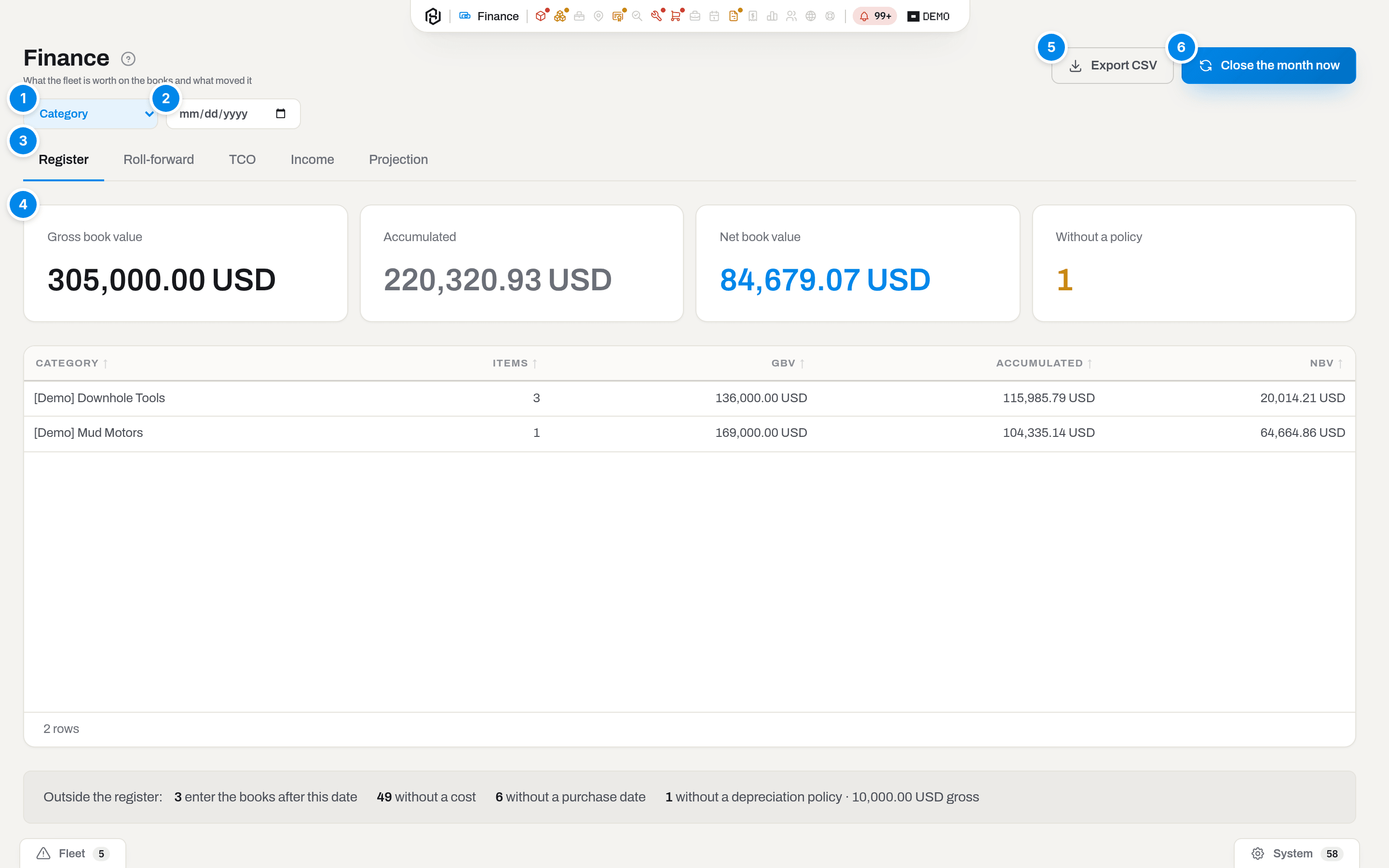
The Register tab, grouped by category.
- Group by — how the table is cut. Register offers Category, Location, Ownership; TCO offers Category and By item; Income offers By item, Category and Client.
- As of — the date the register is counted at. Leave it empty and it counts at the last closed month. It is a filter as much as a date: an item that enters the books after this date is in none of the figures on the screen. How many those are, and the date the first of them arrives, are printed under the table — and inside it while it is empty.
- Tabs — five reports: Register, Roll-forward, TCO, Income, Projection. The tab is in the address, so a link to a report opens on that report.
- Totals — the same numbers as the table, added up: Gross book value, Accumulated, Net book value, Without a policy.
- Export — the report on screen as Excel, CSV or PDF, with the same dates and grouping.
- Close the month now — posts depreciation for the last closed month straight away (Admin only).
The toolbar changes with the tab: Register carries Group by and As of; Roll-forward carries From and To; TCO and Income carry Group by and From / To; Projection carries Horizon instead of dates, and drops Export — a sandbox has nothing to export.
Under the table sits the line that explains what is not counted: Outside the register: followed by a count per reason — {n} enter the books after this date, {n} without a cost, {n} without an exchange rate for their currency, {n} without a purchase date, {n} without a depreciation policy (that last one also carries the gross value it holds). Those items are in none of the figures above. Without a cost and without an exchange rate are two different problems: the first item has no price written on it, the second has one and no way to convert it.
When the table itself is empty, the same counts move inside it, under the line Nothing on the books as of {date}. If there is nothing to count either — no owned assets at all, or a fleet that is entirely rented-in, consumable or already disposed of — the empty table says what the register does count instead. It always names its own reason; it never guesses at one.
Key concepts
The tabs do not count the same fleet
The five tabs answer five questions, and they do not draw on the same set of items. Reading a total off one tab and comparing it with a total on another is the one mistake this screen invites:
| Tab | Counts |
|---|---|
| Register, Roll-forward, Projection | Assets you own that have a cost, a purchase date and a category with a depreciation policy — the register proper |
| TCO, Income | Every asset, including rented-in units and units already disposed of, because they still cost money and still earned it inside the window |
On the demo fleet that is five items in the register against eight in TCO. Depreciation is the only figure both sides share, and it is the same figure.
The three numbers
| On screen | What it means |
|---|---|
| Gross book value (GBV) | What the fleet cost: the purchase amount converted at the rate of the purchase date, plus repairs that were capitalized |
| Accumulated | Everything depreciated so far, plus opening balances and impairments |
| Net book value (NBV) | GBV minus Accumulated — the value still on the books |
| Without a policy | Items that have a cost but whose category has no depreciation policy. They are not depreciated at all, and none of the three numbers above include them |
Every figure is shown in the functional currency set in Settings → Finance. A purchase made in another currency keeps its own currency and the rate of the day it was bought — changing the functional currency does not restate the past.
That rate is captured once, when the item card is born: by hand on New item, by a goods receipt, by an import, or by creating the item from a register row during a reconciliation. It is written on the item and never rewritten afterwards, so correcting a pair in Settings → Finance today does not move the book value of anything bought yesterday. If the pair was missing at the moment the card was created, the item has no rate at all: it waits outside the register under without an exchange rate for their currency until the pair is added and a treasurer sets the rate on the item's money card. Nothing is filled in silently — a rate invented today would not be the rate of the purchase.
The depreciation policy
A policy is the rule by which one category loses value. It is set once per category in Settings → Finance → Depreciation policies (Manager and above) — see Settings & catalogs for the form:
- Straight line spreads the cost evenly over Useful life, months, down to the Residual, % of cost.
- Units of production charges the months the tool actually worked, measured in Hours or Runs against an Expected total. Calendar floor, months keeps an idle tool ageing anyway.
A category with no policy is a decision, not a gap: its items sit outside the register and say so in the note under the table. Until a policy exists and a month has been closed, the Register, Roll-forward and Projection tabs have nothing to show. TCO and Income do not wait for any of that — revenue and running costs are counted from tickets and spending regardless, and only the depreciation column stays at zero.
Note
If your fleet is already depreciated in Sage or a similar register, the lives do not have to be typed in twice: the run screen in Register audit offers Depreciation policies, which reads Life, months out of the confirmed matches and creates the policies for you.
The closed month
Depreciation is not recomputed on the fly — it is posted, one journal line per item per month, and the journal is never rewritten. The system posts the previous calendar month by itself on the 1st at 06:00 workspace time. Everything on this screen reads that journal:
- the Register is the journal added up at a date;
- the Roll-forward is the journal sliced by kind of movement;
- TCO and Income put the same depreciation next to running costs and revenue.
A month that has not been closed contributes nothing to the register. The current month is never closed — it is still running.
Opening balances
A fleet that arrives with history does not start from zero. Opening balance and Opening as of on an item's money card carry the accumulated depreciation from the previous register on its cut-off date; the schedule continues from the next month. Opening balances land in Accumulated and in the Opening line of the roll-forward, but they are not a charge of the month in which they were accepted — the ledger says so with its own feed row and its own wording in the email.
A cut-off date inside a month is visible on this screen. With an opening balance dated 19 August, the schedule starts on 1 September, and before that date the item is not in the register at all. A whole fleet accepted that way therefore reads as empty on the default As of — the last closed month — until the following month is closed. That is not a broken calculation, and the screen does not pretend otherwise: it counts the waiting items, names the date they arrive on, and offers Show {date}.
Contribution is not profit
On the Income tab, Contribution is revenue minus that item's running costs and depreciation. It answers "does this unit carry itself", not "did the company make money": office salary, overheads and tax are nowhere in it.
How to
Read the register on a date
Who: Viewer and above.
- Open Finance. The Register tab is the one that opens by default.
- Pick Group by — Category, Location or Ownership. Ownership always produces a single row: only owned assets are in the register at all, so there is nothing for it to split.
- Set As of if you need an earlier date. Leave it empty for the last closed month.
Result: the totals row and the Book value table both recount; the footer says how many rows. The choice stays in the address, so the view can be sent to somebody as a link.
If it fails: an empty table is never silent. It reads Nothing on the books as of {date} and prints, under it, how many items it left out and why. On a young tenant the usual answer is the date: a fleet accepted in the middle of a month enters the books on the 1st of the next one, so the default cut-off — the last closed month — falls before the whole fleet. The screen then offers Show {date}; one click and the register fills. If the counts say without a depreciation policy, start with the policy; without a cost and without a purchase date are facts to fix on the item's money card; without an exchange rate for their currency means the price is there and the conversion is not — add the pair in Settings → Finance, then set the rate on the item's money card. If there are no counts at all, the register has nothing to hold: it takes owned assets that have a cost, a purchase date and a policy, and it takes them only until they are disposed of.
Check what moved over a period
Who: Viewer and above.
- Open the Roll-forward tab.
- Set From and To. Empty means the financial year so far, up to the last closed month — the year starts in the month named by Financial year starts in in Settings → Finance.
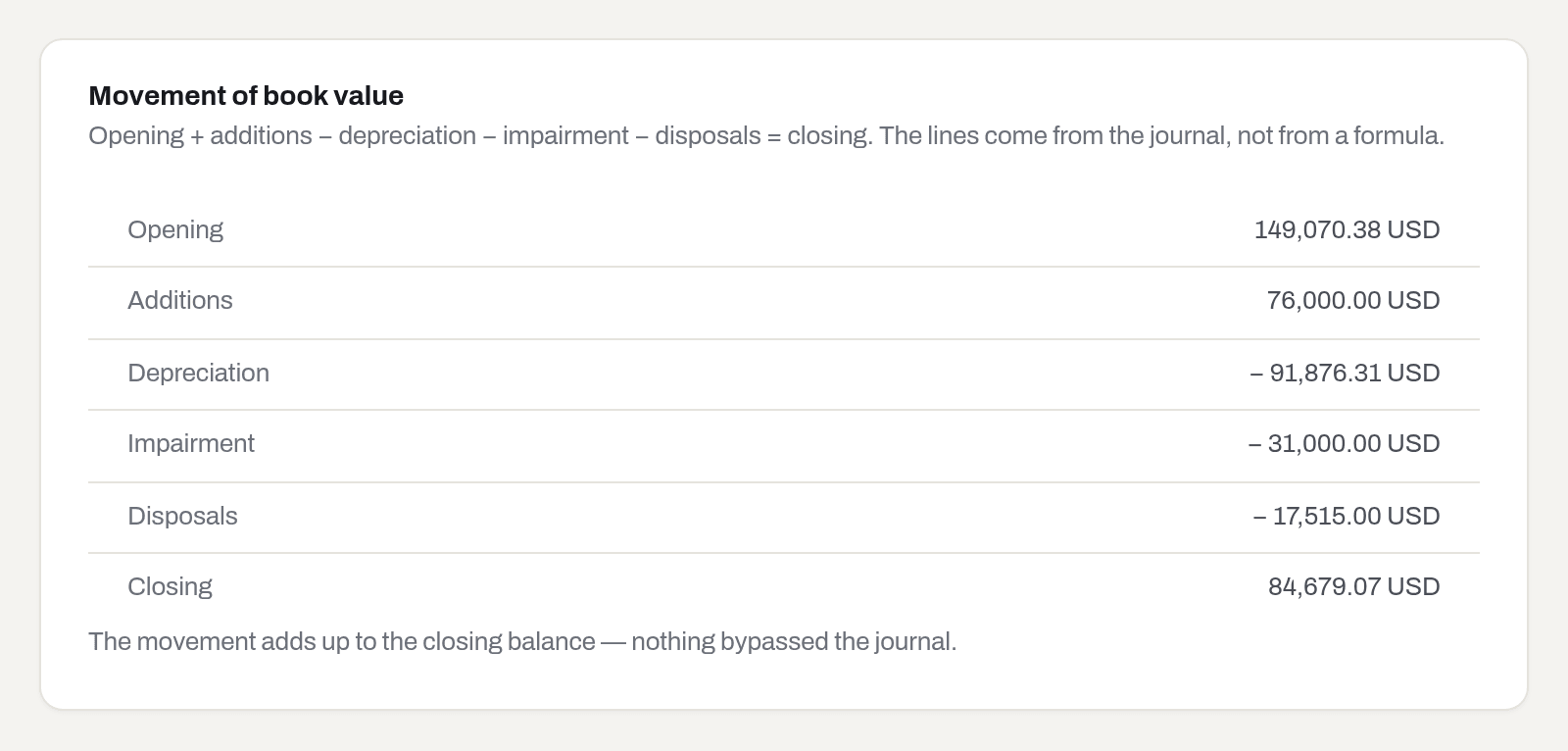
Opening + additions − depreciation − impairment − disposals = closing. Every line is read from the journal, not from a formula.
Result: the card ends with The movement adds up to the closing balance — nothing bypassed the journal.
If it fails: the line reads Off by {amount} — some movement is missing from the journal instead. That is a finding, not a display bug: something changed a book value without a journal line. Close the month again and check the items that were posted.
See what the fleet costs to own
Who: Viewer and above.
- Open the TCO tab and set From / To. Empty means from 1 January of the year that the window ends in — a fixed date here, not the financial year the roll-forward uses.
- Choose Group by — Category for the shape of the fleet, By item for the line-by-line list.
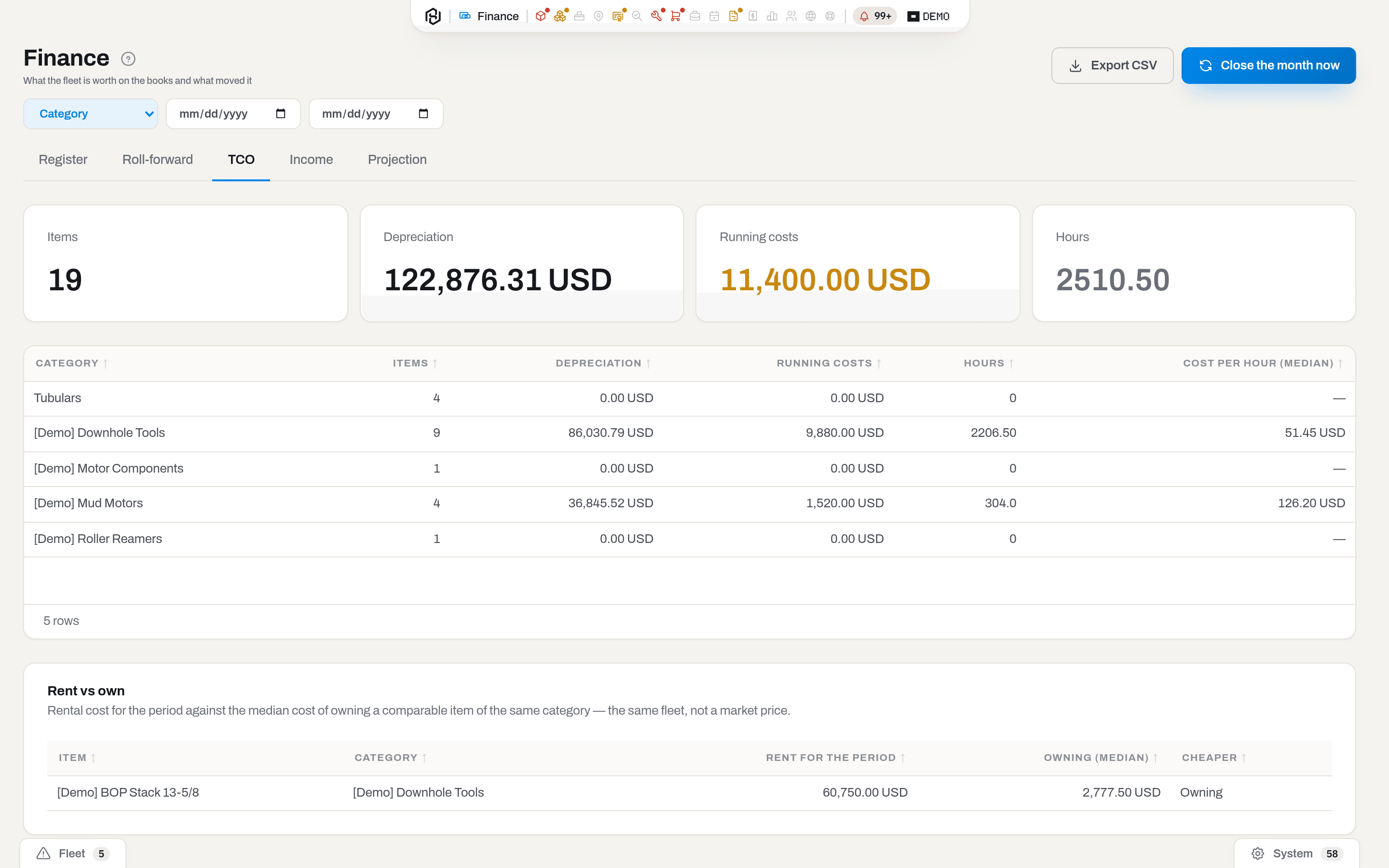
Depreciation and Running costs are two different pockets: what the tool lost in value, and what was actually spent on it. Cost per hour (median) is a median on purpose — one overhaul at 90,000 would drag an average far enough to make the number useless.
Below the table, Rent vs own compares what a rented-in item cost for the period against the median cost of owning a comparable item of your own fleet in the same category — not a market price. With nothing owned to compare against, Cheaper reads No owned item to compare.
Rent is counted by one of two roads, and each row says which one under its amount. From accruals means the item has sub-rental periods that touch the window, and the figure is the rent actually accrued for those months. Estimated from card rate means there is no period recorded, so the rate on the item card is multiplied by the window instead — an estimate, and it is replaced by the real one as soon as a period is entered. An item whose periods are all outside the window is counted from accruals at zero: it was not rented then, and the card rate would answer a question nobody asked.
Result: the four totals and the table recount for the window; Rent vs own appears underneath whenever there is a rented-in item to judge.
If it fails: Nothing to show for this period. means the window has no costs and no depreciation in it, usually because it ends before the first closed month.
See what the fleet earned
Who: Viewer and above.
- Open the Income tab and set From / To. Empty means the same window TCO uses — from 1 January of the year the window ends in.
- Choose Group by — By item, Category or Client.
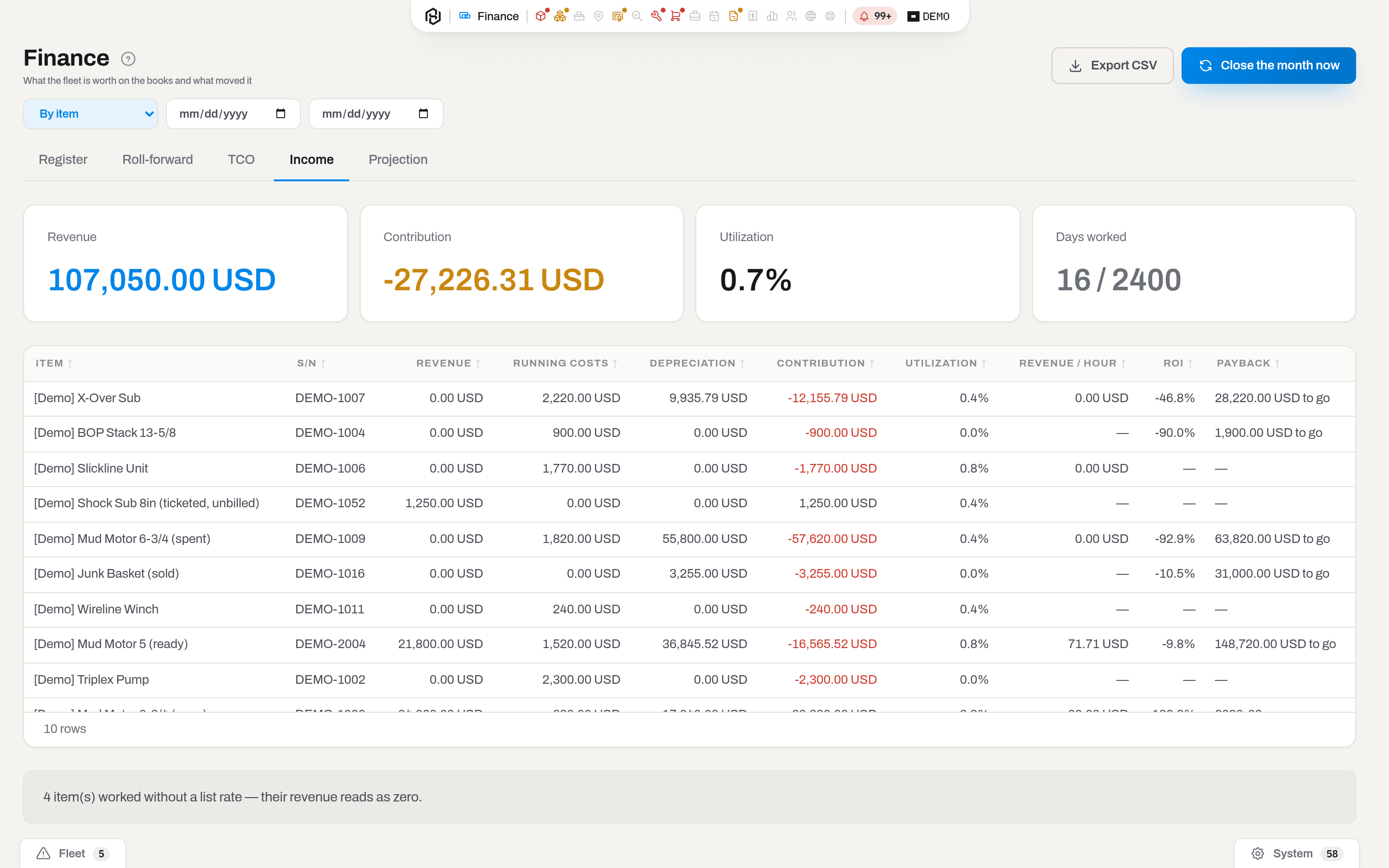
Revenue is not typed in here. It comes from field tickets that have been approved or already invoiced, priced by the rental price book (and, where the book does not cover the unit, by the List rate on the item's money card) — see Field tickets. Utilization is the share of days the unit was billed out of the days it was on the books in the window; days in the yard and days in repair both count against it, because unworked iron is exactly what unutilized means.
Payback shows the month a unit finished paying for itself, or how much it still has to go.
Whatever the grouping, a line appears under the table when some unit worked with no rate anywhere: {n} item(s) worked without a list rate — their revenue reads as zero. Chase it — that unit reads as free.
Grouped by Client, the report also carries an Idle row and a second note about how costs were split:
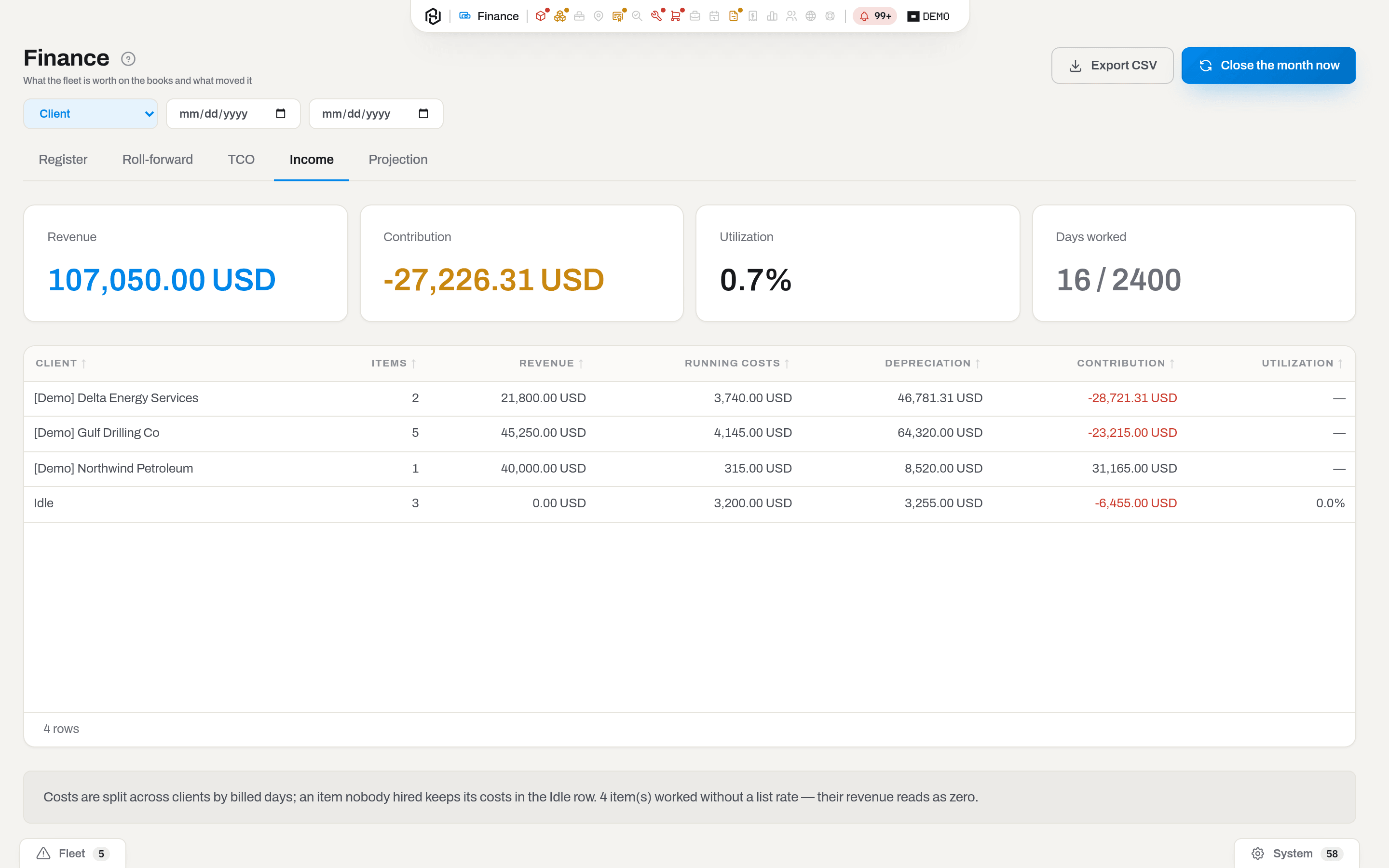
Result: Costs are split across clients by billed days; an item nobody hired keeps its costs in the Idle row. Utilization is blank for a named client — a client has no days "on the books" to be a denominator; only the Idle row and the totals carry a percentage.
If it fails: No income and no costs in this period. means the window holds no approved tickets and no spending — most often a window that ends before the first closed month.
Note
Utilization here and the Utilization board answer different questions. The board is a snapshot of where the fleet is right now; this column is billed days over a period.
See rental revenue from invoices
Who: Viewer and above with Finance.
- Open the Rental revenue tab and set From / To.
- Choose Group by — Month, Client, Rig, Category, Job, Line kind or Size.
- Optionally narrow to one Line kind — Rental, Sale, Service, Labor, Consumable, Repair or Loss.
Revenue here comes from invoices, not from tickets: a line counts once its invoice has actually gone out — Sent, Partially paid or Paid — keyed to the month the invoice was issued in. A Draft invoice is not a snapshot yet and does not count; a Void one released its days back to the calendar and never counted at all.
Result: the KPI row totals the amount, the invoice count, the line count and how many lines had no exchange rate for their currency; the table below breaks the same total down by the chosen group, each row carrying its share of the total — the rows always add back up to the total, whatever the grouping.
If it fails: No rental revenue in this period. means the window holds no invoice past the draft stage — check whether the relevant invoices are still drafts. A nonzero count next to No exchange rate means some lines are in a currency this tenant has no rate for; add the pair in Finance settings and the figure resolves on the next load.
See what is earned but not yet billed
Who: Viewer and above with Finance.
- Open the Month-end accrual tab.
- Set As of — it defaults to the last day of the current month.
This is the same question a departmental spreadsheet asks with an Accrual Amount column and =TODAY(): how much rental has been earned by this date but has no invoice yet. It is not only bookings still running — a booking already returned still shows up here if it has an unbilled tail — so a unit coming off a job does not quietly drop out of the count. Nothing here is posted anywhere — see Close the month now for the only button on this screen that writes to the journal, and note that button does not touch this tab either.
Result: the KPI row totals the accrual amount, the unbilled days behind it, the bookings counted, and how many of them have no rate to price with; the table lists the client, PO, job, unit, the window and days, and the amount — or No rate where nothing prices it.
If it fails: an empty table means every rental booking is already invoiced through this date — there is nothing left to accrue, which is a normal state, not a broken one.
See utilization three ways
Who: Viewer and above with Finance.
- Open the Utilization tab and set From / To.
- Choose Group by — Item, Size, Category, Client or Fleet.
Result: three percentages side by side for the same rows — Time % (booked days over the fleet's days in the window), Usage % (recorded USAGE hours over booked days × 24) and Dollar % (revenue over the unit's acquisition cost). They are different questions, not three views of one number: a unit can read low on time and high on dollar, and the other way round. No GBV marks a row with no acquisition cost to divide by, so Dollar % is left blank for it rather than guessed at.
If it fails: this table counts owned fleet only — client-owned units and items already disposed of are never in the denominator. See also the live Utilization board, which answers "where is the fleet right now", not "how hard did it work over this window".
See revenue and expenses by dimension
Who: Viewer and above with Finance.
- Open the By dimension tab and set From / To.
- Choose Group by — Department, Line of business or Purpose. These are the same three tags set in Settings → Catalogs → Document dimensions and on the document itself (job, request, order, invoice, credit note, work order).
Result: the KPI row totals revenue, expenses, margin, invoices and orders for the window; the table breaks the same totals down by the chosen tag, one row per value plus a — row for documents that carry no tag at all. Revenue comes from sent, partially paid and paid invoices minus credit notes — the same rule as Rental revenue — and expenses come from purchase orders that are not a draft or cancelled, both keyed to the document's own tag rather than to the job or client. There is no Export on this tab: the table is short — at most a handful of rows per axis.
If it fails: No invoices or orders in this period. means nothing billed or bought in the window has this axis set at all — check the window first, then whether the documents involved were ever tagged. A — row that keeps most of the money is not a bug: it just means most documents predate this feature or were never tagged. Setting the tag on a document's own page moves its share into a named row on the next load; there is no bulk way to tag past documents.
Disposals
Who: Viewer and above with Finance.
- Open the Disposals tab.
- Narrow by Year, Category or Reason.
This is the register's own account of what left the fleet — Sold, Lost or Retired — and why, read off the disposal reason recorded on the status change (see Change the status) rather than off the status alone. Each row is one item: when it was disposed of, its age at that point, hours and KREV, and the money — Net book value, Proceeds and Profit or loss — carried over from the disposal line in its journal. An item disposed of before it ever had a cost, a policy or a closed month shows no NBV or P&L at all, not a zero: there was no journal line to read it from.
Above the rows, the totals group the same items by year, category and reason — counts and sums, so how much did retirements cost us this year is answered without opening a spreadsheet.
Result: the rows and the group totals recount for the filters chosen; Export downloads what is on screen as Excel, CSV or PDF.
If it fails: an empty tab means nothing left the fleet under the filters chosen — check Year and Reason are not narrower than intended. A row with no reason shown means the status was changed without one; the item is still in the list, only the reason column reads blank.
Note
Retiring an assembly also retires what is standing in it: components installed on a unit that is sold, lost or retired are removed from it in the same event, so they stay in the fleet as their own units instead of vanishing with the parent. See Containers, assemblies and what is inside.
Forecast the book value
Who: Viewer and above.
- Open the Projection tab.
- Pick Horizon — 12, 24, 36 or 60 months.
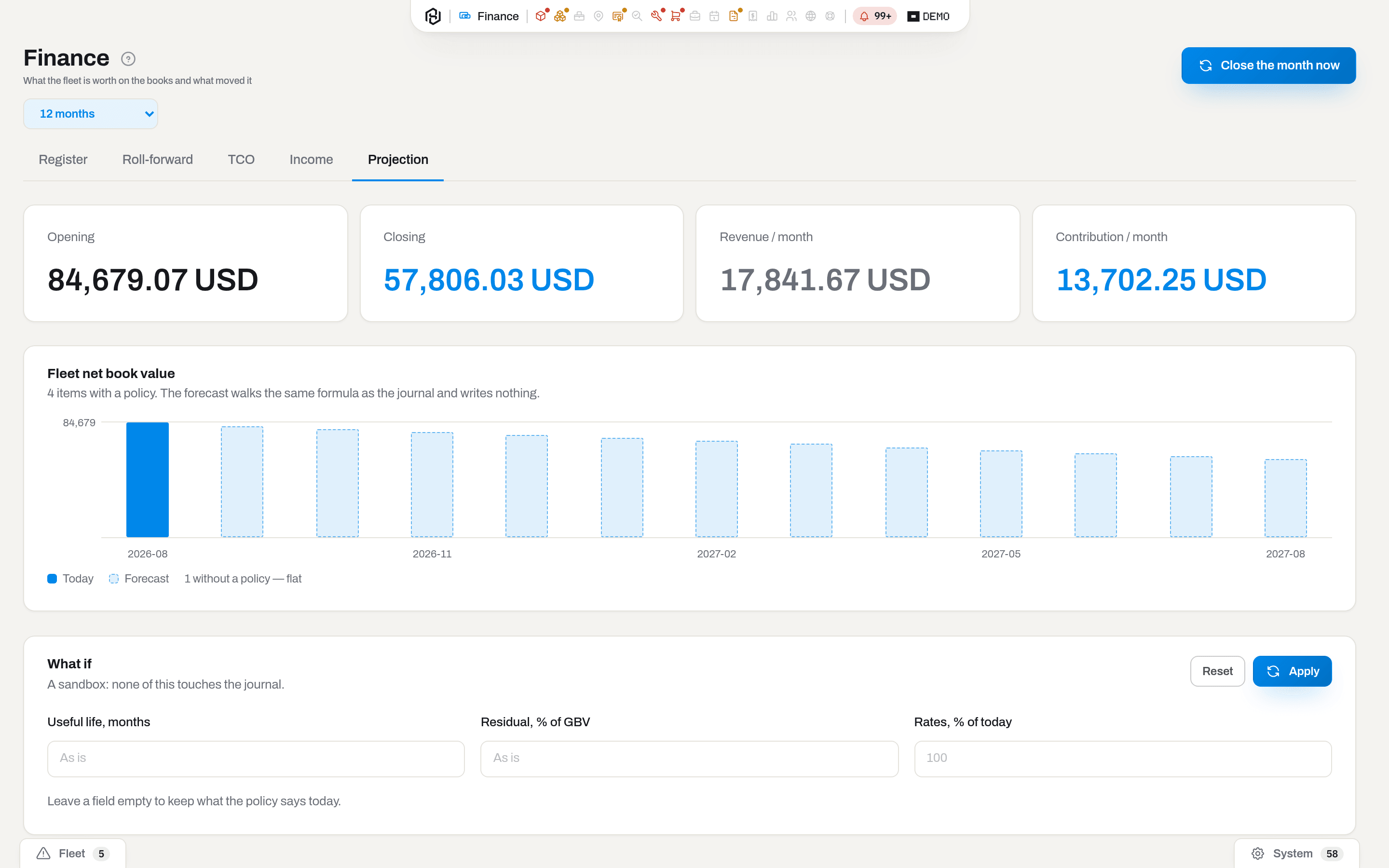
The first bar is Today — the register as it stands; the pale bars are the Forecast, walked with the same formula the journal uses. Items with no policy are not in the curve at all — they never entered the register — and the legend counts them so the number is not silently missing: {n} without a policy — flat.
To try another assumption, fill in the What if card and click Apply; Reset puts it back. Nothing here is written down — see Fields.
Result: the chart and the four totals redraw. The journal, the policies and the closed months are untouched, which is the point: checking "what if the life were 84 months" must not cost a policy edit that closed months cannot take back.
If it fails: an empty chart means the register is empty — see Read the register on a date. There is no Export here on purpose.
Export a report
Who: Viewer and above.
- Open the tab you want and set its dates and grouping.
- Click Export and pick Excel, CSV or PDF.
Result: the file downloads with the window and grouping you are looking at — register-<date> (register-latest when As of is empty), rollforward, tco, unit-economics, rental-revenue, rental-accrual-<date> or rental-utilization, with the extension of the format you picked. CSV keeps the raw keys; Excel reads with column titles and words instead of codes and a bold header; PDF is a landscape printout. The register export is per item, not per group: the table shows totals, the file shows the lines behind them.
If it fails: there is no Export on Projection. A sandbox produces no figures worth filing.
Close the month now
Who: Admin only.
- Click Close the month now (top right). There is no confirmation dialog.
- Wait for the toast Saved. Every tab reads the journal, so all five show the new figures.
The run posts the last closed month — the previous calendar month, never the one still running — for every owned asset that has a cost, a policy and a purchase date. Only an item whose disposal has already been posted is left out. An item that has been out of the ledger for a while catches up in the same run: one line per missing month, back to the day it went into service or to its opening balance.
Warning
Closing a month cannot be undone. The journal is append-only: there is no button, on this screen or anywhere else, that reopens a posted month. A wrong fact — the cost, or the date the item went into service — is corrected forward: fix it on the item's money card and the next run posts an adjustment line. A wrong policy is a different thing again: see the FAQ below.
You rarely need this button. The system closes the month by itself on the 1st at 06:00 workspace time. Press it when you have just set the first policies, just accepted opening balances, or just added a fleet with history and do not want to wait for the 1st.
Result: a feed row for managers and admins in this section, and an email to the fleet's digest recipients (see What the system tells you).
If it fails: Requires tenant role 'admin' or higher. — the button is only drawn for admins, so this appears if your role changed while the page was open. Pressing it twice is harmless: the month is already closed, the repeat posts nothing, and it leaves no run behind it either.
See past month-end runs
Who: anyone with the Finance section.
- Open the Runs tab.
- Read the table: newest month first, one row per run — the nightly close on the 1st or Close the month now. A repeat that finds the month already closed leaves no row.
| Column | Meaning |
|---|---|
| Month | The closed month the run posted. |
| Status | Normally Done. A run is all or nothing: one that fails posts nothing and leaves nothing behind, and the next run posts the whole month. Running and Failed exist for runs in progress or interrupted outside the usual path. |
| Started / Finished | When the run began and ended, in your time zone. |
| Items posted / Entries | How many assets got depreciation, and how many journal lines that took (catch-up months add lines, not items). |
| Depreciation | Total posted by the run, in the workspace currency. |
| Skipped | Assets the run left out, by reason: no policy, no cost, no FX rate, no date, disposed. Fix the item or its category policy and the next run posts it; a disposed item is left out for good — its disposal is already posted. |
Result: nothing changes — the tab only reads. Close the month now adds a row here when it posts something.
Fields
The only thing this screen writes into is the What if sandbox on Projection, and it writes nothing to the database. Leave a field empty to keep what the policy says today.
| Field | Meaning | Required | Who edits |
|---|---|---|---|
| Useful life, months | Pretend every policy uses this life instead of its own | no | Viewer+ |
| Residual, % of GBV | Pretend the residual is this share of gross book value | no | Viewer+ |
| Rates, % of today | Pretend rental rates are this percentage of today's — 100 is unchanged | no | Viewer+ |
What the system tells you
| When | Feed row | Who gets it | |
|---|---|---|---|
| A month is closed with depreciation posted | {period} closed in the ledger | {period} closed: {amount} depreciation on {items} items | Feed: managers and admins with this section. Email: the fleet's digest recipient list; when that list is empty, every manager and admin |
| A month is closed and only opening balances were accepted | Opening balances accepted for {period} | The same email, worded for an opening run | As above |
| An item reaches the end of its book life | Fully depreciated: {name} | — | Managers and admins with this section |
| An item leaves the register | Sold: {name} or Written off: {name}, with proceeds and result | — | Managers and admins with this section |
| Items have a cost but their category has no policy | {n} items are not being depreciated — an action row that clears itself when a policy covers them | — | Managers and admins with this section |
The last one is the only "do something" the ledger ever raises, and it disappears by the same fact that raised it: create the policy and the row goes. It also feeds the System tab of the bell — it is a to-do about the fleet, but the tab is chosen by kind, not by subject. Nothing about the ledger is announced as a banner inside this section.
Related
- Item card — the money side of one unit: Journal, the NBV curve, cost of ownership, Edit and Impair. Impairments and disposals recorded there are what shows up here as movement.
- Settings & catalogs — functional currency, financial year, capitalization threshold, standby factor, exchange rates and the depreciation policies themselves.
- Register audit — pulling cost, purchase date, life and opening balances out of an external register, and creating policies from it.
- Field tickets — where the revenue on the Income tab comes from.
- Invoices — what was billed to a client. It is a different section and a different question: Income counts approved work at list rates, an invoice is the paper that was sent.
- Utilization — where the fleet is right now, as opposed to how much of the period it was hired for.
- Glossary — GBV, NBV, TCO, ROI, contribution, impairment.
FAQ
Why is everything empty? — On Register the screen answers that itself: under Nothing on the books as of {date} it prints how many items it left out and why. Five reasons, in the order they usually bite: the items enter the books after this date (a fleet accepted mid-month starts on the 1st of the next one — press Show {date}), they are without a cost, without an exchange rate for their currency (the price is written, the pair to convert it is not), without a purchase date, or without a depreciation policy — set one in Settings → Finance, then use Close the month now. Roll-forward and Projection read the same fleet and go quiet for the same reasons. TCO and Income depend on none of it — if they are empty too, the window holds no spending and no approved tickets.
Why is an expensive tool missing from the register? — Read the counts under the table. An item is outside the register if it enters the books after the As of date, if its category has no policy, if it has no cost, if it has a cost in a currency with no exchange rate, or if it has no purchase date. All five are shown as counts, and the gross value hidden behind the policy one is shown as money. A sixth answer never appears as a count, because it is not a gap in the data: rented-in gear, consumables and items already disposed of are not on the register at all.
Why does the register not match today? — Because it counts at a closed month. As of left empty means the last closed month, not today; the month in progress is never posted.
I set a longer life — why did the closed months not change? — They never do, and no correcting line is written either. A change of policy is a change of estimate: it applies from the next open month onwards, spreading the value that is left over the life that is left. Only a change of fact — the cost, or the date the item went into service — produces an adjustment line on the next run.
Why is Contribution negative for almost everything? — Depreciation runs every month; revenue only arrives on the days the unit is hired. Over a short window, or over a fleet that is sitting still, that arithmetic is expected. Compare with Utilization in the same row before reading it as a loss.
Can I get the numbers per item instead of per group? — Yes: TCO and Income both have By item under Group by, and Export on the Register writes one row per item even though the table shows groups.
Who can see this at all? — Anyone whose group has been granted the finance section, from Viewer up. The capsule hides the entry from everybody else, and the reports refuse to answer them.
Updated 2026-09-02
New to Hafrix?
See this workflow in your operation
Follow the path from field activity to invoices and operational finance. See how Hafrix connects the records behind your billing.