Trash
Thirty days of second thoughts. Deleting a catalogue record no longer takes it away — the record steps out of the lists and waits here, with everything that hung off it, until an admin puts it back or the nightly clean-up removes what nothing refers to.
Where: the capsule → your avatar at its right edge (Account menu) → Settings (/settings) → Trash, under Data. The open tab lives in the address: /settings?tab=trash is a link you can send to a colleague.
Who can do what
| Role | In Trash |
|---|---|
| Viewer | Nothing — Settings is not in the menu |
| Operator | Nothing — same |
| Manager | Nothing here, though a manager is who usually deletes the record in the first place |
| Admin | Everything on this page: restore a record, purge one now |
Note
Deleting and undeleting are deliberately two different jobs for two different people. A manager keeps the catalogues and may delete from them; only an admin sorts out what was deleted by mistake.
At a glance
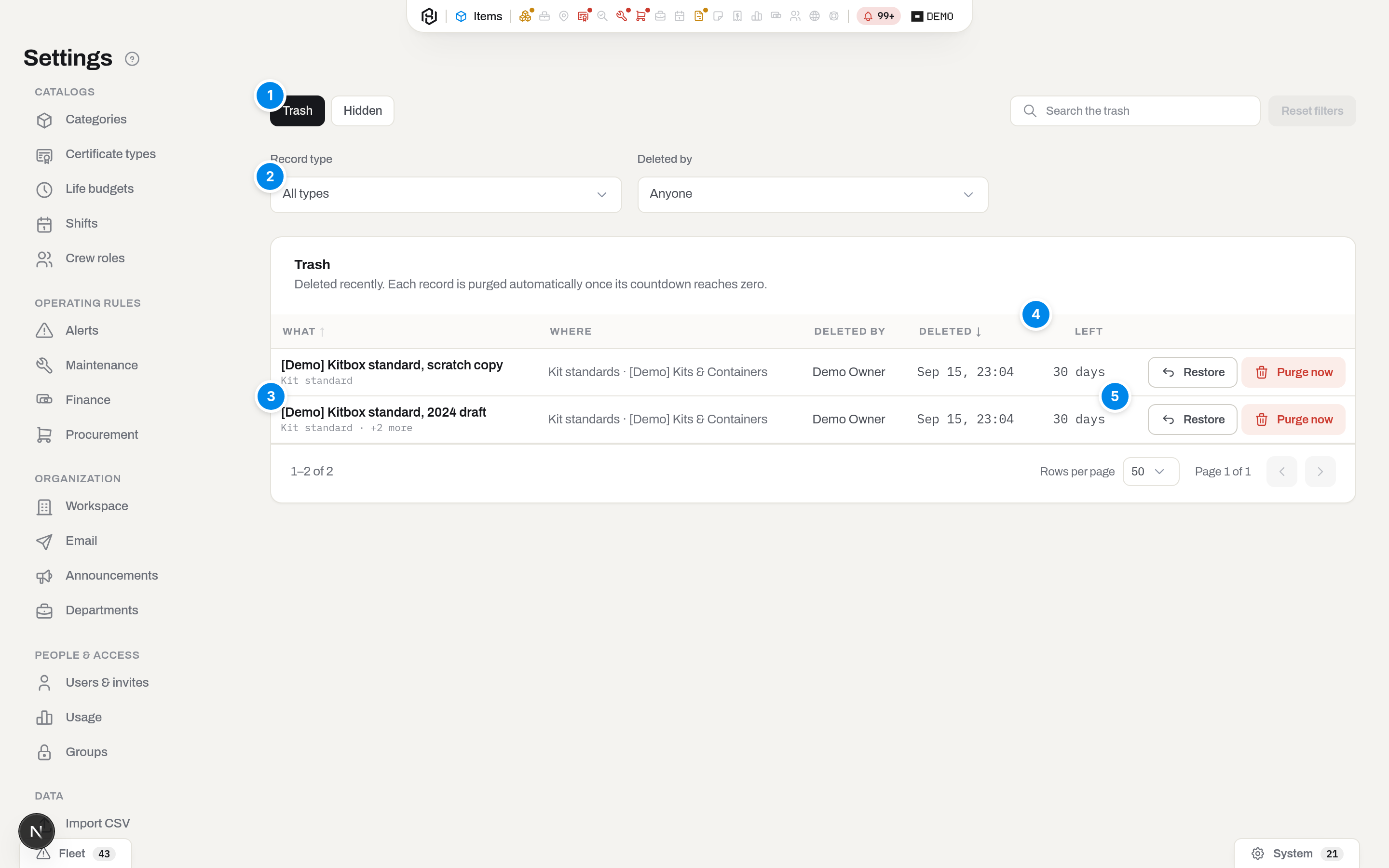
- Trash / Hidden — two tabs, two different states. Trash is the thirty-day window: these records are still on their way out. Hidden holds the records the clean-up will never remove, because something in your history still points at them — see Hidden records.
- Filters — by kind of record and by who deleted it.
- A row is an operation, not a record. Deleting a kit standard takes its lines with it, so the standard is the row and its lines ride along as +12 more.
- Left — days until the nightly clean-up may remove the record. On the Hidden tab this column carries the reason it stays instead.
- Restore and Purge now — the two things you can do here.
Key concepts
Deleting hides, it does not destroy. When a manager deletes a category, a location or a kit standard, the record is marked deleted and drops out of every list, picker and filter. Nothing that already refers to it changes: a closed check sheet still names the standard line it was counted against, and a certificate still names its type. That is the whole point — the alternative, blanking the reference, loses the history quietly and nobody notices for months.
Thirty days is the life of the rubbish, not the deadline for changing your mind. A nightly job removes records that are older than thirty days and that nothing refers to. A record something still refers to is never removed — it moves to Hidden and stays restorable for as long as the reference exists.
Archive is not Trash. A catalogue row you take out of circulation on purpose is archived: it stays visible behind a filter, and bringing it back is ordinary work for a manager. Trash is for mistakes. If you find yourself deleting rows you expect to need again, archive them instead.
Trash is per workspace. You see what was deleted in your workspace and nothing else. Support can see the same list read-only from the vendor console when you ask them to look into something.
Restore a deleted record
- Open Settings → Trash.
- Find the row. The filters narrow by kind of record and by who deleted it; the search box matches the record's name and where it was deleted from.
- Press Restore on the row and confirm.
The whole operation comes back, not just the row you pressed: restoring a kit standard restores its lines, in their original order. The confirmation says how many records that is before you agree to it.
If the name is taken. While the record sat in Trash, somebody may have created a new one with the same name — two active categories called Motors cannot exist, so the restore is refused and says which record is in the way. Rename one of the two, then restore again.
Restoring is announced in the workspace feed, so the admins can see that a record came back and who brought it.
Hidden records
A record lands on the Hidden tab when the clean-up tried to remove it and could not: something in your history still points at it. The tab shows what that something is — «219 check lines», «34 items».
These records are not a problem to fix. They are the reason your closed documents still read correctly, and they cost nothing. They stay out of the lists, they stay restorable, and no deadline applies to them.
Purge a record now
Purge now removes the record from the database immediately instead of waiting out the thirty days. Use it when the record is genuinely rubbish — a mistyped duplicate created and deleted the same afternoon — and you would rather it did not sit in the list.
- Open Settings → Trash, find the row.
- Press Purge now and confirm.
This cannot be undone, and it leaves nothing behind: the record goes from the database and its line goes from this list. There is no later screen that remembers what it was called.
The button is not offered for a record on the Hidden tab — something refers to it, and removing it would be exactly the data loss this page exists to prevent. If a reference appears between the list loading and your pressing the button, the purge is refused and names what holds the record.
What is not here
- Documents. An invoice, a purchase order or a check sheet is never deleted — it is cancelled, and it stays in its own section with its own status.
- Units and their history. Items, events and stock movements are not catalogue records and do not pass through Trash.
- People. A user who leaves is deactivated in Users & invites, which is a different job — see Admin settings.
Updated 2026-09-15
New to Hafrix?
See this workflow in your operation
Explore the platform behind these guides: equipment inventory, rentals, maintenance and operational finance. Tell us which workflow you want to see.